How to Test a Mock API from an Android Phone
Published:
This article in Japanese: 日本語
You're in a meeting and someone asks what the API actually returns. You're away from your desk and want to check the shape of a response your app depends on. The backend doesn't exist yet, but you need to decide what the screen shows when a request fails.
None of these need a laptop. A mock API plus a REST client on your phone gets you most of the way.
This post walks through calling a ScenarioMock mock from Mobile API Tester, an Android REST client. The example is a small support-ticket API: create a ticket, see it in the list, update it, then make the API fail with a 401 and a 500. Everything runs against a public demo, so you can follow along without signing up.
What you need
- An Android phone with Mobile API Tester. It's free on Google Play, with a banner ad at the bottom and no in-app purchases. Full disclosure: it's made by ToolboxMApp, the same people who run ScenarioMock.
- A mock API URL. This post uses a public ScenarioMock demo. To build your own, you need a ScenarioMock account (the free plan is enough).
Mobile API Tester sends GET, POST, PUT, PATCH, DELETE, HEAD and OPTIONS requests. You can set headers, query parameters, Basic or Bearer auth, and a JSON or text body, and it shows the status, timing, size, body and headers of the response.
The demo API
The demo lives at:
https://demo-mock--support-tickets.scenariomock.com
You can also open its shared page in a browser to see the endpoints and a live request log.
| Endpoint | Behaviour |
|---|---|
POST /tickets |
Stores the JSON you send, adds a sequential id, returns 201 |
GET /tickets |
Returns every ticket. The 3rd call within 60 seconds returns 500 |
GET /tickets/:id |
Returns one ticket, or 404 |
PATCH /tickets/:id |
Merges the fields you send into the ticket, or 404 |
Every endpoint wants Authorization: Bearer <anything> and returns 401 without it. The token value isn't checked, so demo-token is fine.
The data is shared by everyone who uses the demo and wiped every six hours. Don't send personal data or real tokens: anyone can read the request log on the shared page (the Authorization value is masked, the body is not).
Send your first GET
- Set the method to GET and the URL to
https://demo-mock--support-tickets.scenariomock.com/tickets. - Under auth, pick Bearer and enter
demo-token. - Send.
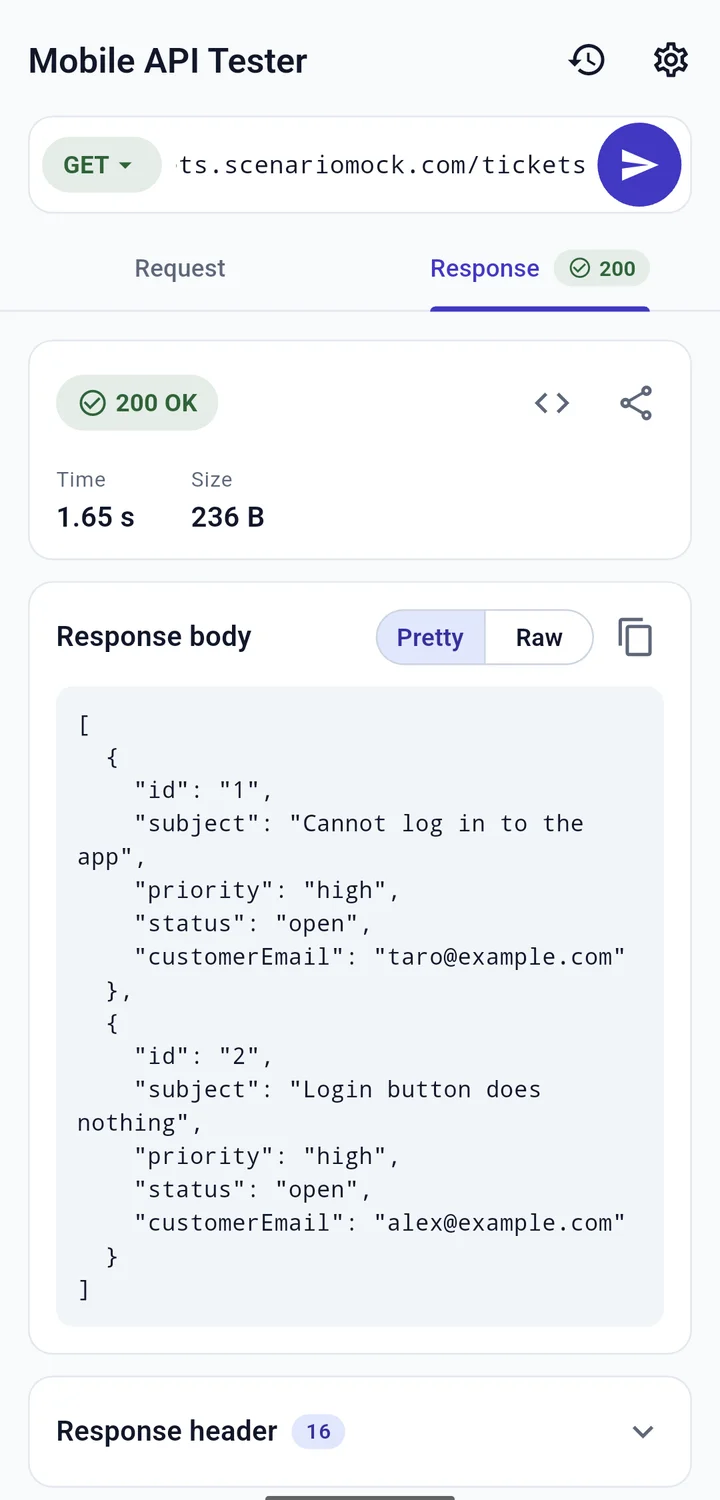
The status comes back with a colour and an icon (✓ for 2xx), along with the response time and size. The JSON body is pretty-printed, and you can switch to the raw view.
Don't be surprised by an empty array []. The demo resets every six hours, and you may also see tickets other people created.
Create a ticket, then read it back
Switch to POST, keep the same URL and Bearer token, and set a JSON body:
{
  "subject": "Login button does nothing",
  "priority": "high",
  "status": "open",
  "customerEmail": "[email protected]"
}
The format button tidies the JSON and checks its syntax. You don't need to add Content-Type: application/json yourself; the app sets it from the body type.
Send it and you get a 201 with your ticket and its new id.
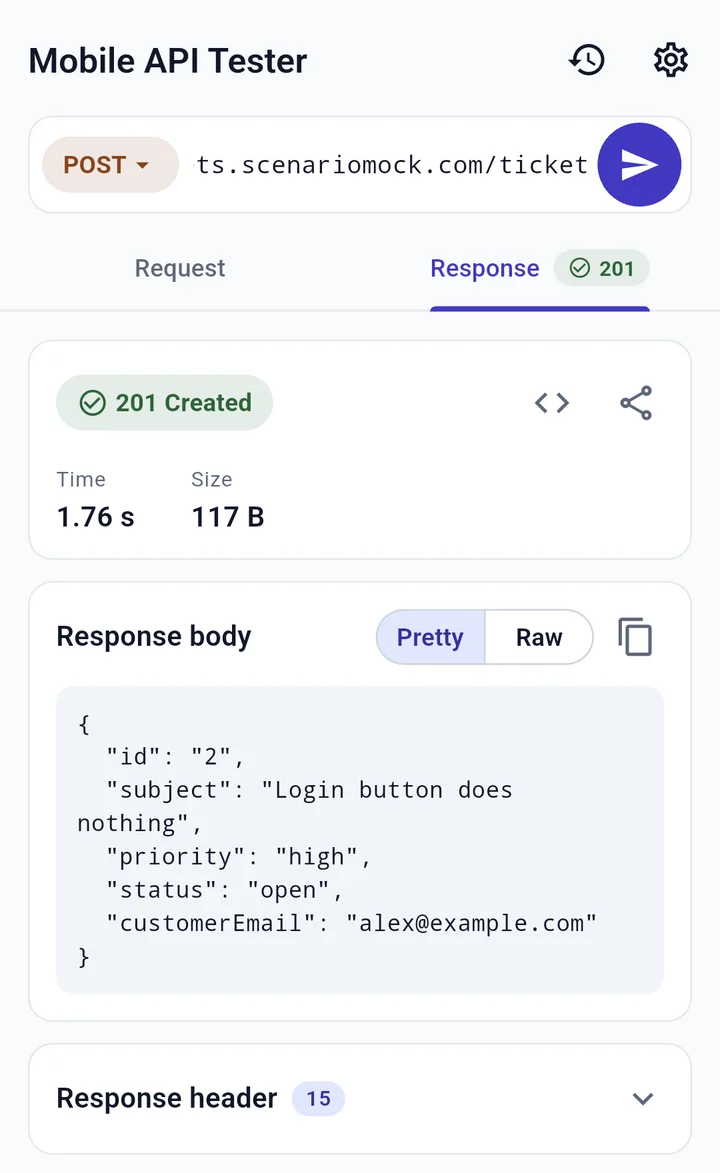
Now send GET /tickets again. Your ticket is in the list. GET /tickets/<id> returns just that one. And a PATCH to /tickets/<id> with {"status": "resolved"} returns the ticket with only status changed; the next GET shows the change too.
This is the part a static mock can't do. A mock that returns a canned response for GET /tickets will never show the ticket you just created. A stateful mock lets you test the whole "create, go back to the list, see it there" flow in your app before the real backend exists.
Make it fail
Happy paths are the easy part. The demo also lets you trigger two errors from your phone.
401: drop the token
Set auth to none and send GET /tickets.
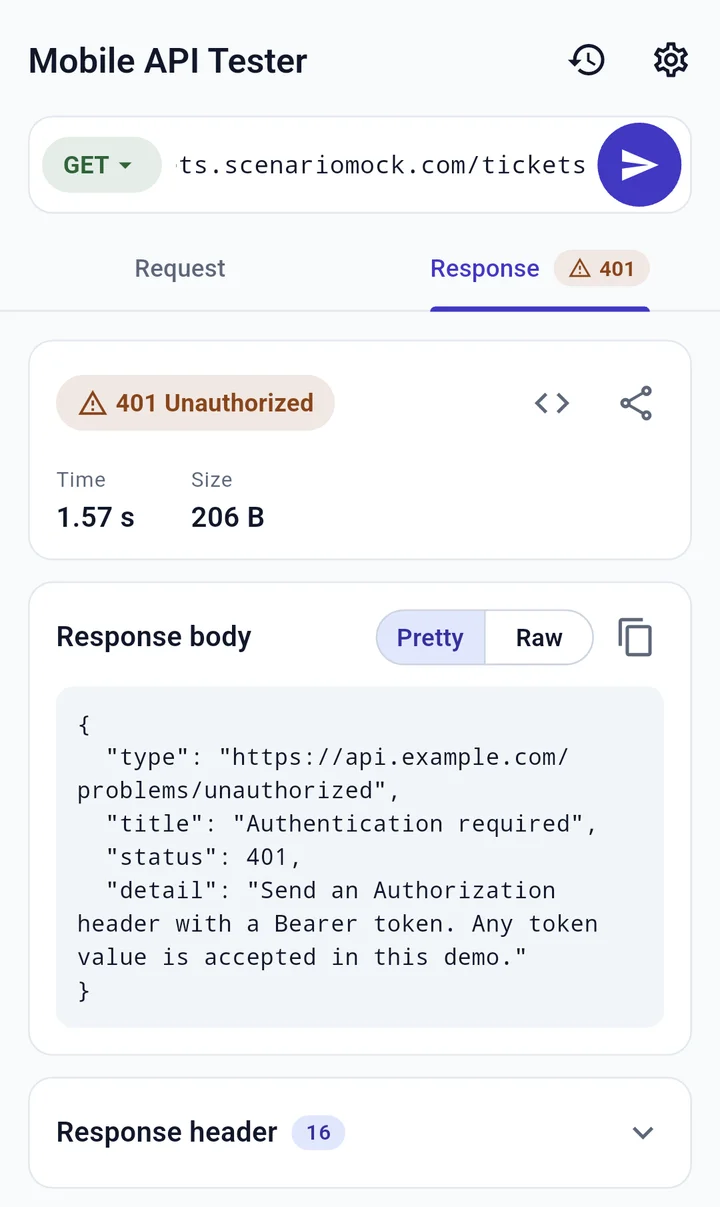
You get a 401 with a warning icon (⚠ for 4xx). Mobile API Tester still shows the body and headers for error responses, so you can read exactly what the API sent back:
{
  "type": "https://api.example.com/problems/unauthorized",
  "title": "Authentication required",
  "status": 401,
  "detail": "Send an Authorization header with a Bearer token. Any token value is accepted in this demo."
}
There's also a WWW-Authenticate: Bearer realm="support-tickets" header. The body follows RFC 9457 Problem Details, the standard format for HTTP API errors.
500: fail on the third call
Put the Bearer token back and send GET /tickets three times in a row. The third one returns a 500 with an error icon (✕ for 5xx). The fourth succeeds again.
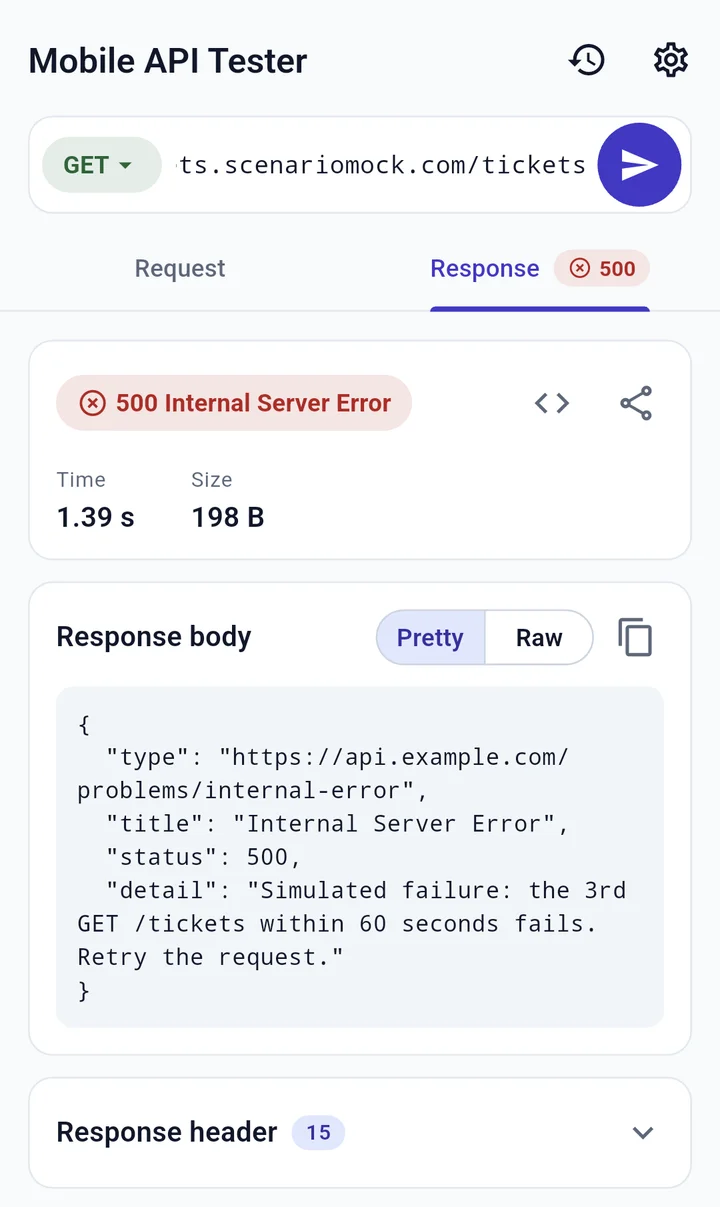
That's a ScenarioMock Sequence scenario: it counts requests and picks a response by count. Here it counts per IP address and starts over 60 seconds after your first request. A few things to know:
- If you sent GETs in the previous steps less than a minute ago, the
500may show up earlier than the third call. Wait a minute and try again. - Switching between Wi-Fi and mobile data changes your IP, so the count starts over.
- In your own mock you decide the steps, for example
503on the first call and200after that. If you're testing retry logic, How to Test Retry Logic Without a Backend goes deeper.
Small things that help on a phone
- Resend from history. Requests are saved automatically (up to 100, including 4xx and 5xx), and one tap loads them again. Swipe to delete. Basic credentials and Bearer tokens are not saved in history.
- Hand it over as cURL. The app shows any request as a cURL command you can copy into a chat, so a teammate at a laptop can run exactly the same call. Responses and error details can be copied or shared too.
- Demo it live. Send the other person the shared page link and make the calls from your phone; they watch the requests arrive in the shared page's log.
- Point it at your dev server. Plain
http://URLs work, so you can call a server running on your local network.
Building your own
To get a mock like this for your own API, create a project in ScenarioMock and note its Mock URL (https://<your-domain>--<project-slug>.scenariomock.com). Add a GET /tickets endpoint and give it a Stateful Collection scenario: state key tickets, sequential IDs, and paths /tickets and /tickets/:id. That alone gets you working create, list, get and update. Add a Conditional scenario to return 401 when the Authorization header is missing; it only applies to the endpoint you add it to.
The docs page covers each scenario type.
One thing your phone won't tell you
A request that works from a phone app may still fail from a web app in a browser. Browsers enforce CORS: before a cross-origin request with a JSON body or an Authorization header, they send a preflight request and stop if the server doesn't allow your origin. Native apps and cURL skip that check entirely.
We ran into this ourselves. In September 2026, while checking ScenarioMock's behaviour one feature at a time for our docs, we found that mock hosts were applying the dashboard API's origin allowlist to preflight requests. cURL calls worked fine; a browser front end sending JSON or a Bearer token would have been blocked. Mock hosts now allow every origin, but the lesson stuck: if your real client is a browser, test from a browser at least once.
Wrapping up
- A mock API and Mobile API Tester let you check API behaviour from your phone, no laptop required.
- A stateful mock returns what you POSTed and reflects PATCH updates, so you can test create-and-list flows before the backend exists.
- Errors are reproducible too: drop the token for a
401, use a Sequence for a500on the third call. Error bodies and headers stay readable. - History and cURL export make it easy to repeat a request or hand it to someone else.
- If the real client runs in a browser, check it there too.
More about the app is on the Mobile API Tester page.
Build a mock API you can call from your phone in a meeting or on the go: stateful data, errors on demand, shareable with one URL.
Create a free mock API